
Earthweb.com Practically Networked Home Earthweb developer.com HardwareCentral earthwebdeveloper CrossNodes Datamation
Welcome to PractiallyNetworked
 
Get The Newsletter!  
  
Product Reviews

 • Routers
 • Hubs/Switches
 • Wireless Gateway
 • Wireless AP
 • Wireless NIC
 • Network Storage
 • Print Servers
 • Bluetooth Adapters
Troubleshooting
& Tutorials

 • Networking
 • Internet Sharing
 • Security
 • Backgrounders
 • Troubleshooting
    Guides

 • PracNet How To's
User Opinions
Practicallynetworked Glossary

 Find a Network Term  
 
Daily News
Compare Prices

 • Routers
 • Hubs/Switches
 • Servers
 • Storage
 • Adapters
 • Wireless
Forums
About
Jobs
Home

internet.commerce
Be a Commerce Partner


Find a Hotspot...

Add this search code to your site!
Copyright 2003Jupitermedia
  Most Popular Tutorials

• Microsoft Vista Home Networking Setup and Options
The most daunting part of upgrading to Windows Vista may be trying to figure out where in the layers of menus the networking and file-sharing options are hidden.

• Do It Yourself: Roll Your Own Network Cables
It may not be something you do everyday, but having the supplies and know-how to whip up a network cable on the spot can be very handy.

• Tips for Securing Your Home Router
Seemingly minor and easily overlooked settings can still have profound security implications. Here are some steps you can take to make sure your wired or wireless home router — and by extension, your network — is as secure as possible.

  Most Popular Reviews

• Microsoft Windows Home Server
If you have a home network, you'll welcome the easy file sharing, remote access and the image-based backup features of Windows Home Server.

• Iomega StorCenter Network Hard Drive
Iomega's fourth generation StorCenter Network Hard Drive brings many of the features found in higher-end storage devices down to an attractive price.

• MikroTik's The Dude
This free tool delivers many of the same capabilities that you'd find in pricey network monitoring tools. As long as you don't mind tinkering, The Dude is a decent network utility that should be worth the download.


Networking
SW Proxy Servers  
NAT SW (ICS, Sygate, etc)
NAT HW Routers
NAT HW & SW
Wireless
Other Problems
 
Secure LAN
Special Applications
Other Help
Tools

  Although you may think that WinMe is mostly a bugfix version of Win98, Microsoft slipped a little surprise into the Networking part of it.  They replaced the TCP/IP stack with the one used in Win2000.

So the first thing you should do if you're having Networking problems in WinME is to download the Win2000 (or WinMe) drivers for your Network adapters from adapter manufacturer's Web site.  Then use the Update Driver button (Device Manager > Network Adapters > Network Adapter Properties > Driver Tab) to install the newer drivers.

If that doesn't fix things, your problem could be due to the "Detect connection to network media" feature that is now part of the Network Adapter properties.
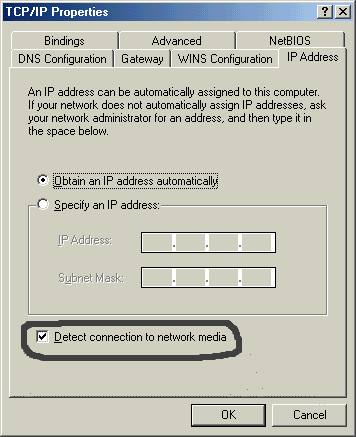
WinME TCP/IP properties window

Here's what Microsoft says the feature does:
[from Knowledge Base Article Q260953]
Windows Millennium Edition (Me) contains a Media Sense feature. Media Sense detects whether or not your network media is in a "link" state. A "link" state is defined as the physical media connecting or inserting itself on the network. For example, assuming that your computer has a 10baseT or 100baseT physical medium, Ethernet network adapters and hubs typically have a link light to indicate the current connection status.

Windows Me can also detect a link in this manner. When Windows Me detects that the media is disconnected or down, it removes the bound protocols from that adapter until it is detected as up again. This functionality requires a network adapter driver that supports Media Sense.

That last sentence seems to be where the problem is.  Seems that it's hard to tell when your Network adapter supports the "Media Sense" feature, or whether it supports it the way Microsoft thinks it does.

Easiest thing to do is try it both ways!  Just check or uncheck the "Detect connection to network media" box on the copy of TCP/IP that is bound to the network adapter that you're having trouble with (just look for the one with the name of your network adapter or something similar). One of the settings should work.




The Earthweb Network


Earthwebnews.com Earthweb developer.com HardwareCentral earthwebdeveloper CrossNodes Datamation

internet.commediabistro.comJusttechjobs.comGraphics.com

Search:

WebMediaBrands Corporate Info

Legal Notices, Licensing, Permissions, Privacy Policy.
Advertise | Newsletters | Shopping | E-mail Offers | Freelance Jobs


Home | Networking | Backgrounders | Internet Sharing | Security | HowTo | Troubleshooting | Reviews | News | About | Jobs | Tools | Forums