ICS is much easier to set up in Win2000 than in Win98SE and WinMe. There’s no software to install, and it doesn’t add any network components or protocols. But Win2000 gives you less control over how ICS works. You can’t:
- disable the DHCP server.
- change the server’s IP address or the range of addresses allocated by the DHCP server.
- share the connection over two different networks.
WARNING #1! These instructions are for Windows 2000 Professional. They don’t apply to Windows 2000 Server.
WARNING #2 Don’t enable ICS if any computer in your network is configured as a domain controller, DHCP server, or DNS server. Don’t enable it if another computer is running ICS or Network Address Translation (NAT).
WARNING #3 To enable ICS, you must be logged on as a user which is a member of the Administrators group.
WARNING #4! If you establish a Virtual Private Networking (VPN) connection while sharing a different connection, the client computers won’t be able to access the Internet until the VPN connection is ended.
Continue below for Dialup setup. Go here for Cable Modem or ‘DSL setup.
Setup for Dialup Connection
If you are using a dial-up connection to connect to the Internet in Win2000, you’ll need to do the following to use ICS:
 NOTE: It’s important that you have a network card, modem, and dial-up connection installed before you try to set up ICS.
ICS requires two network connections to work its magic. If it doesn’t see two (i.e. dial-up and the network card), it won’t show you the “Shared Access” tab in the dial-up connection’s properties.
To prepare for ICS installation:
- Set up your dial-up connection and test it so that you know you can connect to the Internet.
- Set up your LAN with TCP/IP so that you know your computers can communicate with each other. If you don’t know how to do this, go here.
With those steps completed, the rest is easy! Here’s how I set up Win2000 ICS to share a dial-up connection.
Open the Network and Dial-up Connections folder by right clicking My Network Places on your Desktop and selecting Properties. Then right click the dial-up connection and select Properties.
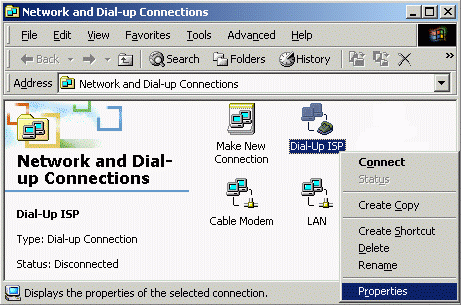
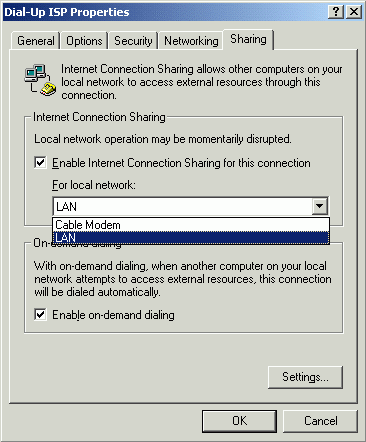
The Properties sheet shows the settings associated with the connection.
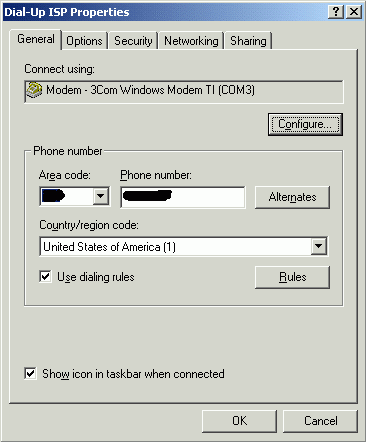
Click the Sharing tab, then check the Enable Internet Connection Sharing box and the Enable on-demand dialing box.
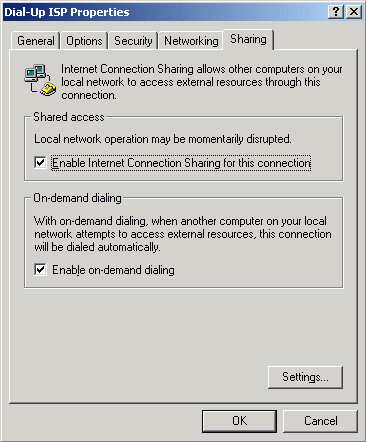
If you have more than one network adapter connected to local area networks, you’ll see this screen instead. Click the down arrow and select the one to use for sharing the dial-up connection.
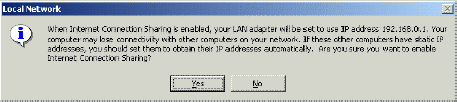
After enabling ICS, click OK. Win2000 warns you that it will change the IP address of the LAN adapter. Click Yes to continue.
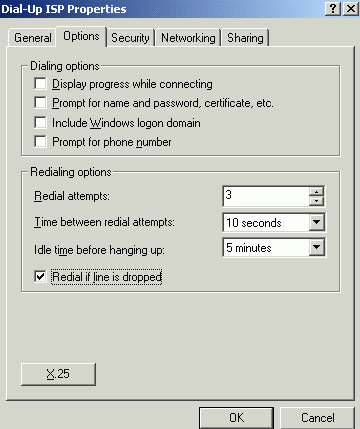
Now open the dial-up connection’s Properties again and go to the Options tab to configure it. The connection will dial automatically when a client computer requests Internet access. If you don’t want to have a window pop up on your screen showing that dialing is in progress, un-check the first box. You can also configure the connection to hang up automatically when it has been idle for a certain length of time. Click OK after making the settings.
The ICS server is now set up, and ICS is running. You don’t even need to reboot. Now go here to configure your Clients.